
The concept of “agentic AI on Kubernetes” appears impressive in theory; however, the practical aspects include managing Docker containers, addressing networking issues, and dealing with challenging configuration files. This post focuses on configuring Kagent—a Kubernetes-native AI agent framework—to function with a local LLM, without reliance on cloud services or API keys.
The Setup Challenge
Starting with Docker Desktop’s built-in Kubernetes cluster, the goal was straightforward: install Kagent and connect it to a locally-running language model.
Kagent is an open-source, Kubernetes-native framework for building and running autonomous AI agents directly within Kubernetes clusters, designed for DevOps and platform engineers to automate complex cloud-native operations like troubleshooting, monitoring, and managing workloads using natural language instructions and predefined tools for services like Kubernetes, Prometheus, and Istio.
The installation began enabling kubernetes (kubectl) on Docker Desktop and installing Helm, then using helm to install the core Kagent components into their own namespace. Some pods began failing with ImagePullBackOff errors: the controller, UI, and agent runtime images simply wouldn’t pull properly on Windows.
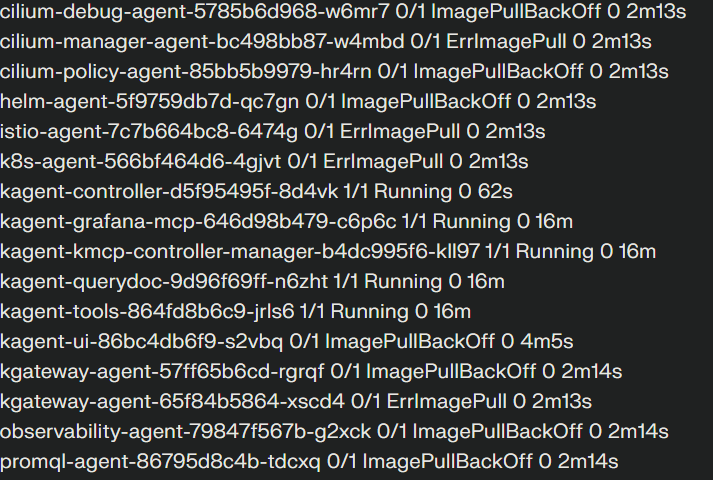
The solution was manual intervention: pulling each image directly through Docker, then forcing Kubernetes to retry by deleting the stuck pods. With images cached locally, the pods finally started successfully. Port-forwarding exposed the Kagent dashboard at localhost:8080, and the framework was technically running.
But it wasn’t actually useful yet. The default configuration pointed at a model endpoint that didn’t exist in any meaningful way.
The Localhost Problem
We wanted to leverage a local LLM that proved working (using a previous script from the post)
The trouble started when trying to reach that same endpoint from inside Kubernetes. Pods couldn’t resolve host.docker.internal, and even when they could, the connection failed. The issue was fundamental: services bound to localhost are invisible to Kubernetes workloads. What works in a script on your desktop doesn’t automatically work for containers in a cluster.
Testing confirmed the endpoint was healthy—curling it from the host returned proper JSON. But inside the cluster? Nothing. This revealed the first major insight: local development with LLMs requires thinking about network topology, not just whether the model runs.
For that attempt the configuration was easier: get docker model running and just connect to the exposed port, but now we needed to do a brand new setup quite different from before
Attempting to use the host machine’s actual IP address instead of localhost didn’t help. Connections to 192.168.x.x:12434 were refused, confirming the server was bound exclusively to loopback. The only path forward was changing how the model was served.
Enter Ollama
The requirement simplified to: “get the smallest working model reachable from Kubernetes.” Ollama provided the answer.
Running Ollama in Docker was straightforward—one command to start the container with volume persistence and port mapping, another command pulled llama3.2:1b, a tiny but functional model. Testing via curl from the host confirmed everything worked.
The critical test came next: could Kubernetes pods reach it? Spinning up a temporary busybox pod in the Kagent namespace, the model endpoint was queried directly. Hitting /api/tags listed available models. Sending a test prompt to /api/generate returned a completion from the 1B parameter model.
This was the breakthrough moment. The network path worked, the model responded, and suddenly the problem space had shrunk dramatically. Everything infrastructure-related was now aligned.
Configuring Kagent
Kagent manages LLM connections through ModelConfig custom resources. The default configuration referenced the old, unreachable endpoint with provider type Ollama but pointing at the Docker Model Runner URL.
Editing the ModelConfig required three changes refelected in three different yaml files: keeping the provider as Ollama, updating the model name to llama3.2:1b, and changing the host to ollama:11434—no protocol scheme, just the service name and port that Kubernetes DNS could resolve.
After some trouble making a generic busybox running (we needed to again use a manual docker pull and then make the temp-shell start) we have been able to succesfully add our local LLM with OLLAMA to our kagent namespace
All the pieces were finally in place: Kubernetes cluster, Kagent components, Ollama service, working model, and correct configuration pointing everything together.
The API Semantics Gap
With infrastructure aligned, the first chat attempt with the agent produced a new error from litellm, Kagent’s LLM client library: Ollama_chatException - /11434/api/chat.
This error was illuminating. It showed that litellm’s Ollama adapter was calling /api/chat, while the testing had confirmed /api/generate was the correct endpoint for this Ollama version. The problem wasn’t networking anymore—it was API compatibility.
WOULD MAKE SENSE IF VENDORS AGREE ON A COMMON STANDARD TO EXPOSE THESE ENDPOINTS???
Different LLM servers expose similar functionality through different paths and payload formats. Even when everything routes correctly, mismatches in expected endpoints or request structures will surface as connection failures.
This is the second major lesson: getting local agentic AI working isn’t just about installing software. It’s about understanding the assumptions each component makes about the others.
What This Actually Teaches
From a practical standpoint, this experience strips away the mystique around running AI agents locally. It’s not magic—it’s a chain of concrete technical pieces that either align or don’t.
The chain looks like this: Kubernetes cluster, container images, network services, DNS resolution, custom resource definitions, API endpoints, and LLM servers. When something breaks, the debugging process becomes a targeted inspection of each link.
Once you make this chain visible to yourself, troubleshooting stops feeling mysterious. Every error points to a specific layer where assumptions diverged from reality.
The Practical Takeaway
Running Kagent with a local LLM on Docker Desktop is achievable, but it requires understanding several systems simultaneously. You’re not just running an AI agent—you’re orchestrating containers, managing Kubernetes resources, configuring network services, and ensuring API compatibility.
The reward is complete control. No external API dependencies, no usage charges, no data leaving your machine. Just your hardware, your containers, and a system you can inspect and modify at every layer.
For anyone attempting this setup, the key is patience and systematic debugging. Each error message is information. Each failed connection attempt narrows down where the mismatch lives. And once everything aligns, you have a fully local AI agent system that you understand from the ground up.
Will add some more details (including all the commands I used for this exercise) in the future (would also like to use another model to make this thing finally fully working)
 VibeOps
Leave a comment