
Claude Code is powerful — but without the right habits you burn through your budget fast. Here are 7 rules the community has converged on, plus a zero-token startup banner to keep them front of mind.
The Problem Everyone Runs Into
Scroll through any Claude Code community thread and you will find the same story: a developer opens the CLI, fixes one thing, tweaks another, adds a follow-up, pastes a whole file “just in case” — and an hour later the token counter is deep in the red. The session grew without anyone noticing.
Token exhaustion is almost always a workflow problem, not a model problem. The fix is a set of habits. And habits only stick when you are reminded of them consistently.
7 Rules That Actually Reduce Token Usage
These are patterns that have emerged repeatedly from users who optimized their Claude Code workflows.
1. Keep sessions short and clean.
Every new message forces Claude to re-read the entire conversation. Use /clear between unrelated tasks and start a fresh session when you switch context.
2. Write complete prompts in one shot.
Follow-ups like “now also fix the test” or “actually rename that variable” each re-process the full thread. Write the complete request once, upfront.
3. Batch related tasks.
Instead of three separate messages for “fix bug”, “refactor code”, “add tests” — send them together: “Fix the bug, refactor the code, and add tests.” The model reads context once and produces one complete solution.
4. Be strict with context.
Pasting an entire file when only one function is relevant is the most common hidden cost. Share only the snippet you need, trim logs before pasting, and reference files by path instead of re-pasting them.
5. Use the right model for the job.
Formatting and quick edits → lighter model. General coding → mid-tier. Complex multi-step reasoning → full model. Using a heavy model for everything is unnecessary token burn.
6. Avoid correction loops.
Patching the same output again and again in the same thread makes the conversation longer and more expensive with every turn. If things get messy, restart the session and reframe the problem with clear, final requirements.
7. Keep prompts simple and direct.
Long, over-specified prompts increase token usage without improving output quality. Avoid repeating instructions, adding unnecessary background, or over-explaining the obvious. Be clear, be direct, focus on what matters.
The Gap Between Knowing and Doing
Reading a list is not the same as internalizing it. The real challenge is applying these rules in the middle of a debugging session when the instinct is to just send another message.
The fix is equally simple: display the rules every time you launch claude.
A startup banner costs zero tokens — it runs before Claude starts. It takes three seconds to read, and over time turns the list into muscle memory. Here is how to set it up on both platforms.
Bash / Zsh Setup (macOS and Linux)
Save this as ~/.config/claude-banner.sh:
!/usr/bin/env bash TEAL='\033[38;5;73m'; BOLD='\033[1m'; R='\033[0m'GOLD='\033[38;5;214m'; MUTED='\033[38;5;244m'; WHITE='\033[97m'W=70; border=$(printf '%0.s─' $(seq 1 $W))echo -e "${TEAL}${BOLD}╭${border}╮${R}"echo -e "${TEAL}${BOLD}│${R}$(printf '%s' 38 \ "${BOLD}${GOLD} ⚡ CLAUDE CODE — TOKEN BEST PRACTICES${R}")$(printf '%s' 33 "")${TEAL}${BOLD}│${R}"echo -e "${TEAL}${BOLD}├${border}┤${R}"tips=("1 ${WHITE}Short sessions${R} /clear between tasks — one thread per topic""2 ${WHITE}One-shot prompts${R} Write the complete prompt once, don't patch""3 ${WHITE}Batch tasks${R} Fix + refactor + tests → one single message""4 ${WHITE}Trim context${R} Snippets only — no full files, no raw logs""5 ${WHITE}Right model${R} Formatting→lite Coding→mid Reasoning→full""6 ${WHITE}No fix loops${R} Stuck? Restart session and reframe clearly""7 ${WHITE}Simple prompts${R} Clear & direct — avoid over-explanation")for tip in "${tips[@]}"; do echo -e "${TEAL}${BOLD}│${R} ${MUTED}${tip}${R}"; doneecho -e "${TEAL}${BOLD}╰${border}╯${R}"; echo ""
PowerShell Setup (Windows)
Save the banner script somewhere accessible then add this wrapper to your PowerShell profile (notepad $PROFILE):
function Invoke-Claude {. C:\Progetti\claudeBanner\claude-banner.ps1$claudeBin = (Get-Command claude -CommandType Application -ErrorAction SilentlyContinue |Select-Object -First 1).Sourceif ($claudeBin) { & $claudeBin @args }else { Write-Error "claude binary not found in PATH" }}Set-Alias -Name claude -Value Invoke-Claude -Option AllScope -Force
Three details worth noting:
Get-Command -CommandType Applicationresolves the real binary on disk, bypassing the alias — this prevents infinite recursion.Select-Object -First 1handles the case where bothclaude.cmdandclaudeexist in PATH.@argsforwards all arguments unchanged, soclaude --helpandclaude -p "…"keep working normally.
Reload with . $PROFILE. From that point on, every new terminal picks it up automatically.
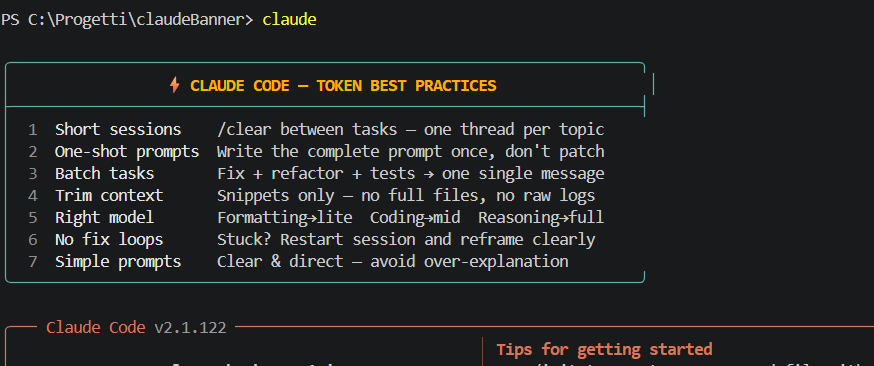
The Point
No tool can fix bad habits automatically. But a three-second reminder at the start of every session is enough to make you pause before pasting a 400-line file or firing off a fifth follow-up message.
The banner costs zero tokens. The rules it shows you will save thousands.
Leave a comment below if you have a rule that should be on the list.
 VibeOps
Leave a comment